Google Gemini Enterprise
- 4.1
- Rating
- 1.00M
- Installs
- Free
- Price

 Analysis by App-foxy
I approached Google Gemini Enterprise as a productivity app rather than a novelty chatbot. That distinction matters. The first impression is easy to understand: it brings Google’s AI tools into the working day, with the aim of helping employees move through different tasks without constantly switching between separate services. The real question, though, is whether that convenience survives after the first week, when the excitement of trying new prompts has worn off.
My answer is cautiously positive. I can see a lasting role for it when a person has recurring work that involves drafting, organizing thoughts, summarizing material, or turning a rough request into a more usable starting point. I would not treat it as an automatic replacement for careful research, specialist software, or human review. Its value depends heavily on whether I use it as a practical assistant with clear boundaries, rather than as an authority that can be trusted without checking.
This is a free productivity app from Google LLC, rated for Everyone. It is available for devices running Android 11 or later, and the current release is version 26.05.2908.924558967. The app has passed the novelty stage for many users: it has more than a million installs and holds an average score of 4.4 from roughly 3.9 thousand ratings. Those figures suggest a broad audience, but they do not answer the more useful question of whether I would keep opening it after the first few experiments.
You May Also Like

 Blood Strike: 2.5 Anniversary
Blood Strike’s Loadouts Turn Every Drop Into a Tactical Gamble
A close look at Blood Strike’s custom loadouts: how fast access to signature weapons reshapes its battle royale rhythm, rewards preparation, and narrows the gap between fights.

 Pandora - Music & Podcasts
Pandora’s Music Is Easy to Start, but Harder to Recover
Pandora’s strength is its low-effort path from a seed to a station. Its weak spot is how much confidence it asks you to place in connection, setup, and quiet recovery.

 8 Ball Pool
 Is Built on Rivalries, Rematches, and Routine
A close look at the rivalries, rematches, shared routines, and unanswered safety questions that turn a quick pool match into a persistent mobile community.

 Samsung Music
’s Quiet Strength Is Playing What You Already Own
Its reach comes less from spectacle than from dependable access to a personal library. That simplicity is both the app’s strongest retention engine and its ceiling.

 AccuWeather: Weather Radar
AccuWeather Review: A Quick, Clear Forecast for Everyday Decisions
For everyday plans, the best forecast is the one you can understand quickly. AccuWeather makes rain timing, radar, and local conditions easy to act on, with a few trade-offs.

 Hill Climb Racing
Why Hill Climb Racing Still Turns Crashes Into One More Run
A tiny car, a bumpy hill and one more upgrade: Hill Climb Racing keeps resurfacing because its simple chaos makes every near-miss feel personal.
More From Our News Desk



What the first week feels like in real work
During the first week, the strongest appeal is speed. I can begin with an incomplete thought instead of waiting until I have written a perfect instruction. That makes the app useful when I am staring at a blank page, trying to organize notes, or deciding how to explain something to another person. The best results come when I give it a clear goal, the intended audience, and the format I want back. A request such as “make this shorter” is serviceable; a request that explains what must remain, who will read it, and what tone is appropriate is much more dependable.
That difference is easy to underestimate. Many AI tools look impressive when demonstrated with carefully prepared prompts, but everyday work is messier. I often start with fragments, half-formed questions, or a pasted paragraph that needs direction. Gemini is most useful at that moment when I use the first answer as a draft and then refine it. I do not expect the opening response to be final. I ask it to rearrange, simplify, compare, or challenge the first version, and that back-and-forth is where the app becomes more practical.
A realistic example is preparing for a busy morning. I might have a collection of meeting notes, a few loose priorities, and a message that needs a polite reply. Instead of treating those as three unrelated problems, I can use the app to turn the notes into a short action list, identify questions that still need answers, and suggest a clearer structure for the message. I would still check names, deadlines, and commitments myself, but I save the mental effort of creating an initial shape from scattered material.
Another useful first-week habit is asking for alternatives rather than accepting the first wording. If I need to explain a complicated idea, I can request a version for a colleague, a version for a customer, and a version for someone unfamiliar with the subject. That does not make the writing automatically correct, but it exposes differences in tone and detail that I might otherwise overlook. The app works particularly well as a thinking partner when I already know enough about the subject to judge whether its suggestions make sense.
The first week can also reveal an important limitation: an AI response that sounds confident may still need verification. I would not use a generated answer as the final source for legal, medical, financial, technical, or policy-sensitive decisions. The app can help me frame questions and prepare a checklist, but responsibility remains with the person using it. This is not a minor footnote; it determines whether the tool feels helpful or risky in a professional setting.
Where the novelty becomes a repeatable habit
The transition from experimentation to routine depends on choosing a small number of repeatable jobs. I would not open Gemini for every tiny task. Instead, I would reserve it for work where a blank page, a long block of text, or several possible approaches creates friction. Drafting a project outline, converting informal notes into a structured brief, preparing questions before a meeting, and simplifying internal explanations are all more sustainable uses than asking random questions simply because the app is available.
One of my favorite practical techniques is to separate creation from evaluation. First, I ask for a draft. Then I ask the app to identify unclear claims, missing context, repeated points, or assumptions. Finally, I make the actual editorial decisions myself. This three-stage workflow is more valuable than asking for “the perfect answer,” because it turns the app into both a generator and a critic. It also makes mistakes easier to spot: a weak suggestion is less likely to pass unnoticed when I have explicitly asked for weaknesses.
I also find that giving the app a role can improve the usefulness of the response, but only when the role is specific. “Act as an expert” is vague and often produces inflated language. “Review this as a busy manager looking for missing decisions and unclear ownership” is much better because it defines what to inspect. This is a small change, yet it can make the difference between a generic rewrite and feedback that helps me revise the work.
For people who work across languages, the app can be useful for comparing tone rather than merely translating words. I would use it to create a plain-language version, check whether a phrase sounds too formal, or identify expressions that might confuse a reader. I would still ask a fluent person to review important external communication, especially when cultural nuance or contractual wording matters. The convenience is real, but fluency and accuracy are not identical.
Month-to-month value depends on a narrow routine
After the initial excitement, the app earns its place through repeated small savings rather than dramatic transformations. I would judge it by whether it reduces the time I spend starting, sorting, and revising work. A tool that helps me begin a difficult document several times a week may be more valuable than one that produces an impressive answer once a month. That is why the most durable use cases are ordinary: turning rough material into a workable outline, finding a clearer explanation, and preparing for conversations.
Its role is also different from a traditional search engine. Search is usually better when I need a source, a current page, an exact quotation, or a direct route to a known service. Gemini is more useful when I need help transforming information into a plan, a draft, a comparison, or a set of questions. I would use search to verify a claim and Gemini to help me understand what I should verify. Confusing those two jobs is one of the quickest ways to become overconfident in an AI answer.
Compared with a conventional notes app, Gemini offers more active help. A notes app is better for preserving original material exactly as I wrote it and for building a dependable personal archive. Gemini is better at reshaping that material into a different form. I would keep important source notes in the traditional system and use the AI layer for interpretation, editing, or preparation. That division protects me from losing the original context while still gaining assistance.
Compared with a dedicated writing assistant, Gemini can be more flexible because I can move between brainstorming, explanation, planning, and revision in the same conversation. A specialist editor may still be better for consistent style rules, detailed proofreading, or a publishing workflow. Compared with a task manager, Gemini can help decide what a list means, but it is not a substitute for a system that reliably tracks ownership and completion. The app is strongest as a bridge between messy thinking and structured work, not as the final home for every piece of information.
A useful monthly routine would be to create a small set of personal instructions that I reuse: preferred tone, typical audience, document structure, and the level of detail I want. I would avoid including confidential material unless I fully understand the relevant workplace rules and the way the app handles that content. Even without building an elaborate system, consistent instructions reduce the need to explain the same preferences repeatedly and make the results easier to compare over time.
Another non-obvious benefit is that the app can help me notice gaps in my own thinking. Before a meeting, I can ask it to turn a proposal into objections, dependencies, and decisions that need ownership. That does not predict what colleagues will say, but it gives me a broader preparation checklist. In monthly use, this kind of challenge function may be more valuable than simple text generation because it improves the quality of the questions I bring to real people.
The maintenance burden is mostly human
The app itself is easy to keep available, but using it well requires maintenance from me. I need to remember which outputs were drafts, which claims were checked, and which instructions still reflect my needs. If I allow conversations to become a pile of unlabelled experiments, the convenience declines. I would periodically delete or organize old material according to my own privacy and workflow requirements, rather than treating the chat history as a perfect knowledge base.
Prompt maintenance matters too. A request that worked for one document may be poor for another. A short internal note, a customer explanation, and a technical proposal need different standards. I get better long-term results when I adjust the request to the job instead of relying on one favorite formula. This takes a little discipline, but it is less frustrating than repeatedly correcting an answer that was poorly framed from the beginning.
There is also a review burden. The more polished the response looks, the easier it is to skim instead of verify. I would pay particular attention to names, figures, dates, implied promises, and any sentence that sounds unusually certain. For creative brainstorming, an imperfect answer is harmless and sometimes useful. For workplace communication, a small invented detail can create unnecessary trouble. The app saves effort in drafting, but it does not remove the need for judgment.
People working in teams should establish their own rules before making the app part of a shared process. The important questions are practical: what material may be entered, who checks the output, where the approved version is stored, and how generated text is identified during review. These are not reasons to avoid the tool, but they are reasons not to introduce it casually into sensitive workflows. A personal experiment and an organization-wide habit have very different consequences.
Device compatibility is straightforward for recent Android users because the app requires Android 11 or later. That makes it accessible on many current phones, but anyone using an older device should check compatibility before planning a workflow around it. The app is free, which lowers the barrier to trying it, although “free” does not mean that every user will find the time spent reviewing and refining outputs worthwhile.
What can cause fatigue after the first month
The biggest source of fatigue is repetition without real progress. If I ask for endless rewrites of the same paragraph, I may spend as much time judging variations as I would have spent editing the original. The app is not automatically efficient just because it responds quickly. I get the best return when I use it to make a decision, expose a gap, or create a strong starting point—not when I generate dozens of nearly identical alternatives.
Another frustration is the mismatch between confident style and uncertain substance. Smooth wording can hide a weak assumption. This is especially tiring when I must fact-check every important sentence manually. In those situations, a traditional source, a specialist reference, or a human colleague may be the better tool. Gemini is most comfortable in tasks where I can evaluate the output and where a draft is useful even if it needs correction.
There is also a risk of flattening personal voice. If I accept generated phrasing too readily, my messages can begin to sound interchangeable. I would use the app to improve structure and clarity, then restore the details, opinions, and natural expressions that make the writing mine. This is particularly important for people whose work depends on trust. A technically polished message can still feel distant if it removes the person behind it.
Some users may simply prefer a more focused tool. If I only need a checklist, a notes app may be faster. If I need reliable task tracking, a dedicated planner is a better fit. If I need rigorous document comparison or specialist editing, I would choose software designed for that purpose. Gemini becomes harder to justify when the problem is already solved cleanly by a simpler application.
I would also skip it as a primary work companion if I dislike conversational interfaces or if I rarely have tasks that benefit from drafting and restructuring. The app rewards experimentation and follow-up questions. Someone who wants one-tap certainty may find that interaction tiring. Its flexibility is a strength for curious users, but it can feel like extra work for people who prefer fixed menus and predictable outputs.
Who will keep opening it
I think the strongest audience is people who regularly handle unstructured information: managers preparing discussions, students organizing study material, writers shaping drafts, support workers preparing explanations, and professionals who move between several kinds of communication. These users can turn the app’s flexibility into a habit because they encounter the same forms of friction repeatedly.
It is less compelling for someone whose work is already highly standardized and served by specialized software. A person who mainly enters data into a controlled system, performs precise calculations, or relies on regulated procedures may gain little from adding a general AI layer. In those settings, predictability and auditability can matter more than conversational convenience.
For personal use, I would begin with low-risk tasks: planning an outing, organizing a learning goal, improving a draft message, or turning a long article into questions for further reading. I would not start by handing over sensitive personal records or asking it to make a consequential decision. Building trust gradually is sensible because it lets me learn where the app helps and where my own checking is essential.
The app’s Everyone content rating makes it approachable for a broad audience, but that should not be confused with suitability for every situation. A general audience can use it, yet younger users and inexperienced users may need extra guidance about privacy, accuracy, and the difference between an answer and a verified source. The simpler the interface feels, the more important those habits become.
My long-term verdict after the novelty fades
I would keep Google Gemini Enterprise installed, but I would not make it the center of my entire productivity system. Its lasting value comes from a modest, repeatable role: helping me begin difficult work, reorganize material, test an explanation, and prepare better questions. That is enough to justify regular use when those needs appear often, but not enough to replace search, notes, task management, specialist applications, or human expertise.
The free price makes trying it an easy decision, and the broad reach of Google LLC gives it a familiar place in the Android productivity landscape. Its 4.4 average and more than a million installs show that many people find the experience worthwhile, while the current version indicates that the app is being presented as an actively maintained product. Still, the numbers are only a starting point. My recommendation depends more on whether the app fits a recurring workflow than on its popularity.
If I were recommending it to a friend, I would say this: install it for a specific problem, not for vague curiosity. Choose one weekly task, such as turning meeting notes into decisions or creating a first draft from a difficult brief. Check every important claim, keep source material separate, and revise the output until it sounds like you. If that routine saves noticeable effort without creating more checking work than it removes, the app has earned a permanent place.
If the first month becomes a cycle of generic answers, repeated corrections, and abandoned experiments, I would move back to simpler tools. That is not a failure of the app; it means the job does not suit a general AI assistant. For me, the lasting test is whether it improves the quality of my next action, not whether it produces an impressive response. Used with that standard, Google Gemini Enterprise is a useful productivity companion with real staying power, provided I remain the editor, fact-checker, and final decision-maker.
FAQs for Google Gemini Enterprise
01What is Google Gemini Enterprise and how does it benefit businesses?
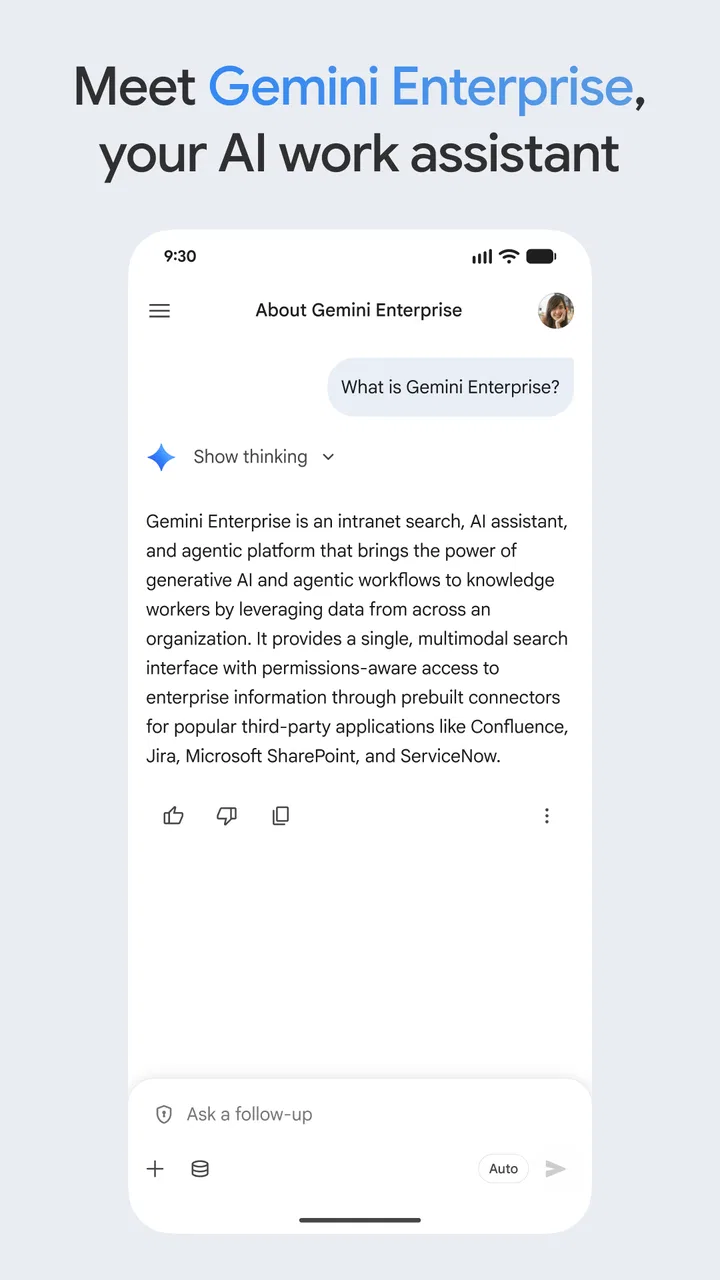
Google Gemini Enterprise is a powerful AI-driven platform designed to enhance business operations by leveraging data analytics and machine learning. It offers tools for predictive analysis, process automation, and customer insights, enabling businesses to make informed decisions, optimize their operations, and improve customer engagement. Its integration with existing Google services ensures seamless usability and scalability.
02Is Google Gemini Enterprise compatible with other software and platforms?
Yes, Google Gemini Enterprise is designed to integrate effortlessly with a variety of other software and platforms. It supports interoperability with popular business tools such as CRM systems, ERP solutions, and cloud services. This ensures that businesses can easily incorporate Google Gemini into their existing workflows without significant disruption or the need for extensive reconfiguration.
03What are the security measures in place for Google Gemini Enterprise?
Google Gemini Enterprise prioritizes security with robust measures, including end-to-end encryption, multi-factor authentication, and regular security audits. It adheres to industry standards and complies with global data protection regulations, ensuring that your business data remains safe and confidential. Regular updates and patches further enhance its security framework by addressing potential vulnerabilities.
04How user-friendly is Google Gemini Enterprise for non-technical staff?
Google Gemini Enterprise is designed with a user-friendly interface that caters to both technical and non-technical users. It features intuitive dashboards, customizable reports, and easy-to-use analytics tools. Comprehensive tutorials and customer support are available to help users navigate the platform, ensuring that businesses can maximize its potential without needing specialized IT knowledge.
05Are there any prerequisites for using Google Gemini Enterprise?
Before using Google Gemini Enterprise, businesses should ensure they have a stable internet connection and compatible hardware. Familiarity with basic data analysis concepts can be advantageous but is not mandatory, as the platform includes extensive guides and support. Additionally, aligning the platform with your business objectives will enhance its effectiveness in meeting your organization’s specific needs.
Pros
- User-friendly interface for seamless navigation.
- Robust security features for data protection.
- Wide range of integration options available.
- Efficient AI tools for business analytics.
- Customizable dashboards for tailored insights.
Cons
- Requires a stable internet connection.
- Initial setup can be time-consuming.
- Subscription costs may be high for small businesses.
- Limited offline functionality.
- Complex features may overwhelm new users.

Google Gemini Enterprise
Gallery